Hello,
I want to use exclusively 2.4G. I can’t find a way to disable 5G from the app. How can I do that?
Thanks for your help!
Hello,
I want to use exclusively 2.4G. I can’t find a way to disable 5G from the app. How can I do that?
Thanks for your help!
Sorry didn’t realise my reply was still in draft
I’m assuming you can see both the 5Ghz (PiFi 4 / PiFi 5) and have 2.4G enabled to see PiFi 2.4 (is that right)
If so, it’s not yet in-app to delete the 5Ghz network but you can either disable it or remove it via LuCI - so if you go to 192.168.3.14 (enter your root password you set in-app) and then under Wireless - tap on remove on the PiFi 4 or PiFi 5 network and hit Apply
**
Is that your current set-up or do you have no 2.4G network yet? (If you can’t see the 2.4G network or don’t have one setup please do not delete above but let me know and I can advise further)
Hi @pifi ,
Thanks for your help! I’m not sure what network I need to delete… Please have a look at the attached screenshot. Please note I renamed my SSID into ftnet.
Thanks again for your help!
You need to first enable 2.4G Mode
Settings > Network Settings > 2.4G Mode on (then you can delete the 5Ghz network which seems named ftnet here)
But need to enable the 2.4G mode network first
I am not able to enable 2.4G mode… I go on the app, try to enable 2.4G. There is a progress bar for a few seconds, then a screen “your pifi is ready”, but there is no change in the Luci UI (my previous screenshot does not change). Also, in the app, 2.4G still doesn’t show as enabled…
Which version are you using?
If you go to app then more settings then system report should show Firmware Version
But hard to suggest if not sure which model of Pi (4/5) or firmware you’re running
Thanks for chiming in!
I am running Firmware Version 0.1.4.1
It’s a raspberry pi 4
Does that help?
It’s an odd issue, but there is an app update going out later this week with various changes to wifi configuration
So without diving too deep into troubleshooting I’d try the app update when it lands towards the end of this week and see if it resolves this for you
I’d first ensure you’ve updated to the latest app release (approved in app stores yesterday) - see on Android or iPhone - you can also find it on repsective app stores by searching PiFi or via pifi.org/app
One confirmed running latest/new version then go to App > Network Settings > 2.4G Mode
And it should enable the 2.4G network
@pifi I updated the app on my phone and tried again. The app says it succeeded, but again if I navigate to “Network Settings”, it says 2.4G is still disabled.
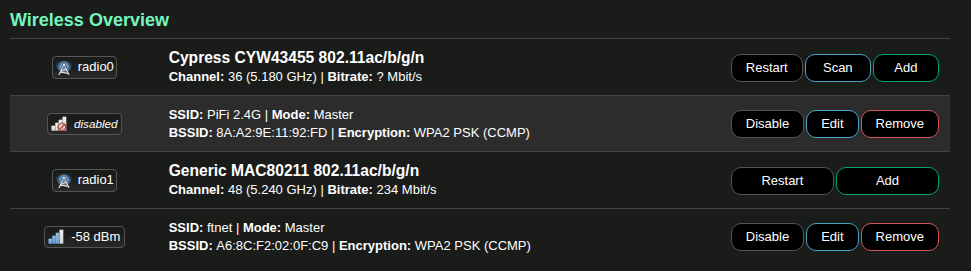
However, if I open my browser to the Luci interface, I can see a new AP named “PiFi 2.4G”. I set a password for it, saved the changes and rebooted the pi. However, it now says it is disabled, although I can’t see an “enable” button for it… See attached screenshot.
Thanks for your help!
It should work, it certainly seems to have at least created the network but it is odd that it’s disabled.
You can try hitting restart on that top network, or rebooting.
If it continues not to play nicely I’d suggest factory resetting the Pi (More Settings > Reset/Power > Factory Reset) as the software supports it and there may be some misconfiguraiton somewhere preventing the radio being up
OK, I think I can pretty reliably reproduce the problem, I did it three times already. Here are the steps:
I did these steps three times already, I can reproduce the problem every time.
If you can fix that /u/pifi, that would be great! Thanks!