I finally had a chance to test the latest Pi5 image and it failed badly.
Can’t connect to active portal
After 1 hour trying, get connected finally, but the DNS for wireguard is broken.
Continually loses the wifi connection
Return home, flash newest image on my SD card for Pi5
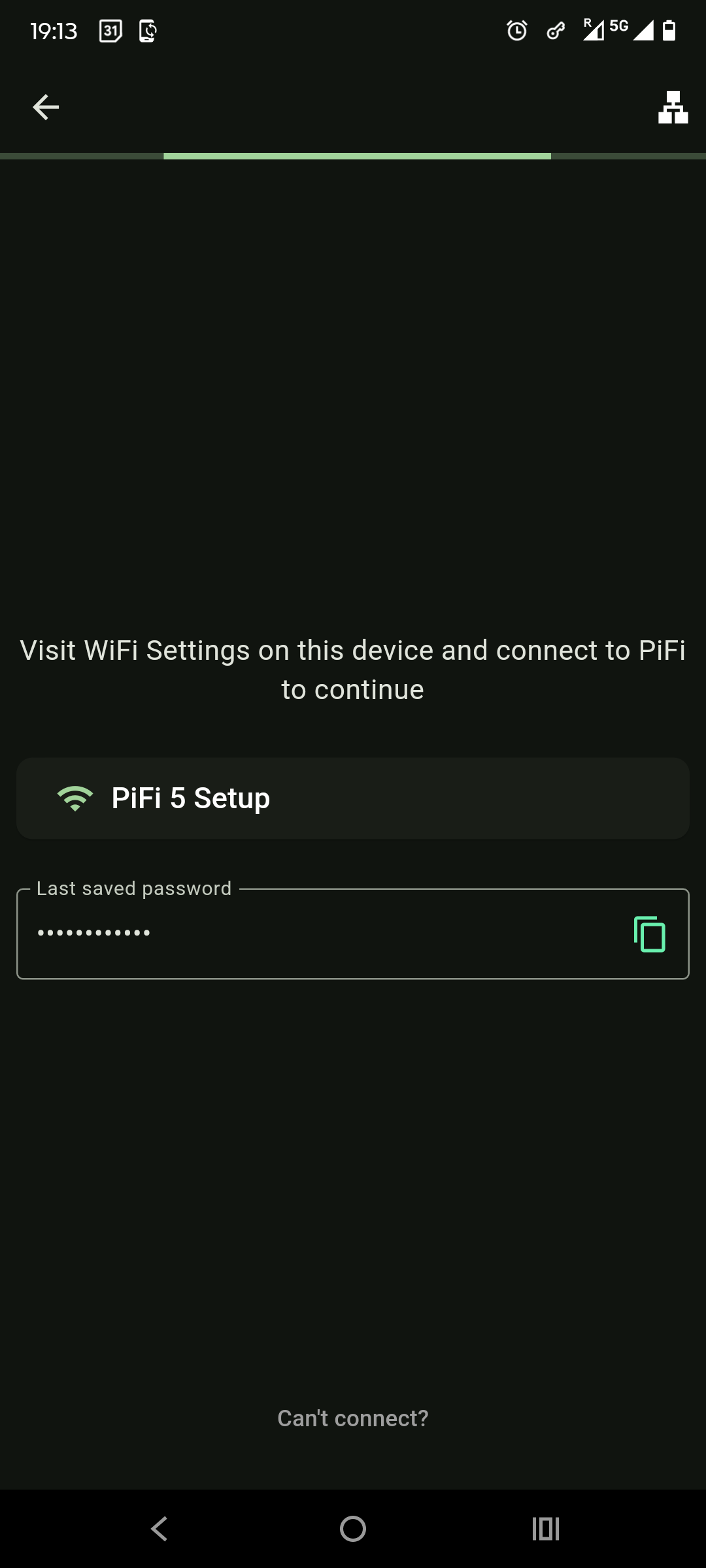
See Pifi 5, connect, but no internet as expected. Open app, select get started, select region and it displays a screen with my last remembered password, but will not let me enter a new password or the Raspberry314. Instead tapping the password field just copies the password to the clipboard so I’m unable to connect the app to the Pifi and the app just keeps spinning forever.
I can’t factory reset since I cannot connect to Pifi 5 network so I’m stuck with a Pi5 paper weight.
I paid for the kit months ago and have not once been able to use the Pifi router. Hope you can help me figure out what’s going on and get it resolved. Thanks
Sorry to hear you’re running into this. Something definitely isn’t right here. What you’re experiencing isn’t the intended behavior, and it hasn’t come up in testing or from other users, but I’ll help you get to the bottom of it.
From what you’ve described:
You’ve flashed the latest PiFi firmware to your SD card.
You’re seeing the Get Started > Select Region screen in the app. That usually means the app is either newly installed or the cache has been cleared.
But then it shows your previously saved password, which suggests some old data has been retained.
This is unusual and at first glance maybe isn’t image related at all. It sounds like the app is in a partially reset state. It’s triggering the onboarding flow, but still remembering credentials from before.
Here’s what I recommend:
Please try fully deleting the PiFi app and reinstalling it from the App Store. This will ensure all old data is removed.
Once reinstalled:
Open the app and go through Get Started > Select Region
It should now show you the default password (Raspberry314) and prompt you to connect to the PiFi 5 network in your device’s Wi-Fi settings.
Once connected, the app should automatically guide you to set a new password of your choosing.
If that doesn’t happen or you get stuck again, let me know and I’ll take care of it personally.
Thanks again for your patience. I’ll make sure we get this working for you.
P.s Edited title as important for titles to be descriptive to help other users who may encounter the issue
Many thanks for the quick response and support. I look forward to getting this working.
I had forgotten to mention in my OP that I had already done what you suggested at least 3 times: I clear cache and data before uninstalling and reinstalling the app. It appears to me that despite what I do the app remains in a confused state and has old data persisted.
On another note, on another SD card I want to try RaspAP and use my Pifi Kit Wifi adapter. RaspAP is not recognizing the adapter. I trust it’s a driver issue. It would be helpful and much appreciated if you could provide to me the make and model of the kit adapter and the drivers I should install on RasperryOS bookworm so I can test RaspAP.
I’m seeing this:
Bus 004 Device 002: ID 0bda:b812 Realtek Semiconductor Corp. RTL88x2bu [AC1200 Techkey]
And have installed drivers for it, but it is not working. Perhaps I’m installing the wrong ones.
I could see the app not fully clearing cache, but if you’ve uninstalled and reinstalled and it’s still showing a custom password (not just the default Raspberry314), that’s definitely unexpected – are you seeing that?
As for Raspberry Pi OS / Raspbian / other Linux distros – yeah, it’s almost certainly a driver issue. USB Wi-Fi adapter support in Linux is notoriously hit or miss. That’s why we ship the PiFi Kit with both the firmware and the USB adapter – the custom firmware includes a stable driver for this chipset.
Getting it working on other Linux flavours might be possible, but I haven’t done it myself and it may be frustrating. It took a lot of effort to get the drivers stable in our official firmware, so support outside that is limited for now. I’d like to make it work with Raspberry Pi OS eventually, but that’ll take time. There may be working drivers out there – I just don’t have one I can recommend yet.
On app - can I ask are you on Android/iPhone - may be something in the system that can force clear it as it seems like it’s the system not fully removing the app files?
I use the Android App and it persists old data despite clearing cache, storage and uninstall/reinstall from app store. This creates so many headaches as the app does not function properly.
Thanks for reporting this. It sounds like the app is retaining old data even after clearing cache, storage, and doing a full uninstall/reinstall. While this isn’t something we usually see and doesn’t seem to be an issue with the app itself, it may be due to how your Android system is caching or backing up app data.
That said, it’s obviously important to get this working properly for you.
Could you try the following?
Tap and hold the PiFi app icon on your home screen
Select “App Info”
Go to “Storage & Cache”
Tap both “Clear Cache” and “Clear Storage”
Doing this from system settings (rather than just reinstalling) may fully wipe any residual data that’s causing issues.
If this still doesn’t solve it let me know what device and Android version you’re using – I’ll try to dig deeper with you. It’s an interesting one to troubleshoot as it’s the system rather than the app retaining the data but will figure it out.
You described my exactly how I removed the app and I reinstalled/uninstalled at least 3 times with same result. I’m using a Pixel 6 Pro on Android 16. I’ve not had this issue with other apps on this device. Thanks for trying to figure this one out because as of now I’m unable to use the Pifi.
Top bar on app continually moves left to right, but app will not advance
I suspect it’s because I had previously changed the password and it won’t advance with Raspberry123 and it won’t let me enter a different password in the field.
So as of now, I have no ability to connect the app to the Pifi. I’m locked out. If you can’t help me fix this, then I kindly request a refund of the kit and I will move on.
Ok, so it showing Raspberry314 (the default password) shows the app has been reinstalled cleanly (which differs from earlier post where it showed a previously saved password - “last remembered password” and not the default?)
So getting somewhere now in that the app isn’t hanging on to old config
**
Fix 1: ‘Stay Connected’ Permission
Android may block access if you didn’t tap Yes on the ‘Stay connected?’ popup when joining a network without internet. Even if it shows as connected, your device won’t talk to PiFi.
To fix it, tap and hold the PiFi network, choose Forget, then reconnect. When prompted, select Yes to stay connected. Or use another device to bring PiFi online.
This popup only applies on certain Android devices, if you don’t see it after forgetting/rejoining then check fix 2.
Yes, the gateway IP is 192.168.3.14 on the pifi network. I did as you suggested. Forget password on Pifi 5. I get the message to stay on wifi on the phone. Tried also on my Ipad Pro. Same thing. I connect to Pifi 5, but the app does not progress. I enter United States and it gets stuck on the next page. It will not progress on my phone and on Ipad. I connect to Pifi 5 from my laptop and navigate to http://192.168.3.14 and it times out. I’m locked out of the Pifi. Note, this is a fresh burned image of latest version for Pi5 from your website so no old residue from an older image. I appreciate your trying to help, but at this point I believe we’ve exhausted all efforts. I’ve had this kit for months and have not once been able to use it. It’s been nothing but frustration and issues. I think you’re awesome. I much appreciate your consistent and timely support. I love the idea and so wanted it to work, but honestly believe this product is not ready for prime time. I think at this point a refund makes the most sense. I’m ready to move on. Thank you.
Big update on this issue. So I love this project and it was bothering me that it wasn’t working so on a whim I attached a monitor to the Pi5 and booted up. I noticed nothing on the screen. Nada, nothing. It does broadcast the Pifi 5 network, but no lines on the screen is suspect. It should produce output as it’s booting up. So, I flashed with Pifi for the RP4 using the Pi4 image. Booted up the Pi4 hooked up to monitor and immediately see lines flashing on the screen as expected. Good sign.
The app immediately recognizes the Pifi 4 and connects. So far working great at home, but need to test from outside and will be doing so later today. So, we’ve been looking in the wrong direction. It’s not the App. The App is fine. It appears to be a boot issue with the Pi5 image. Let’s couch the refund for now as this may be workable on the Pi4. The issue is Pi5 image only. I would suggest please have a look at the Pi5 image and see if you can reproduce. Please keep me posted on update.
By the way, the App seems much more responsive so whatever you did to improve stability is working.
Thanks again for your continued patience and support!
After doing those steps during PiFi App set up after I selected the country, on the next page *** I was still getting the “last saved password” spinning screen ***
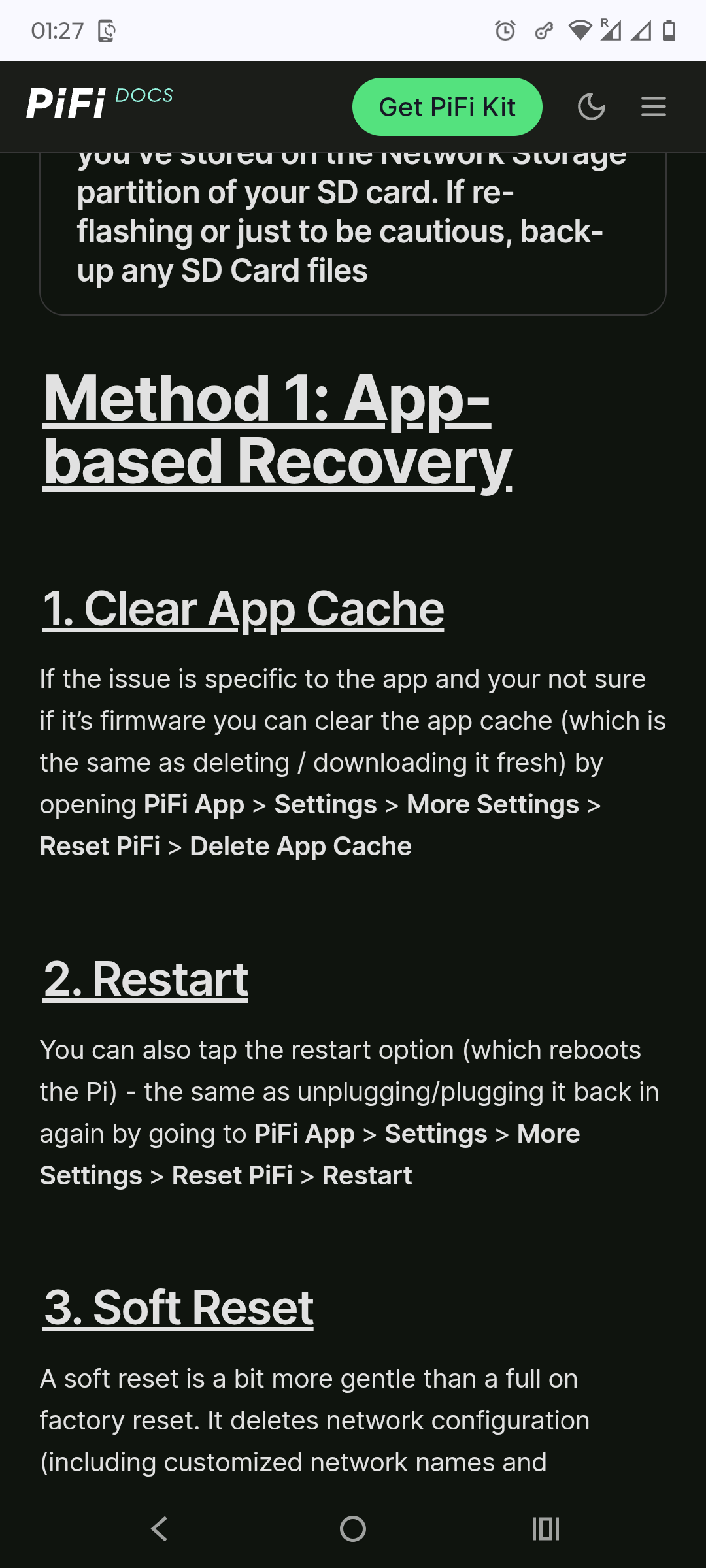
I’ve been messing with this for several hours already today so eventually came across this doc:
I followed step 1 there of App based recovery:
“Clear App cache”
After this step then I finally was able to go through the setup of PiFi app !
It’s strange cos I believe I did that step this afternoon (~ 10 hours ago ) so somehow between forgetting PiFi network , connecting again , removing the App cache clearing/uninstalls/reboots/reinstalls it was finding some old information somewhere which was not allowing me to enter the PiFi Admin password.
Hi, that’s a really odd one. I’ll dig into it. I would have expected Android’s clear cache and storage to be equivalent to the in-app reset.
It sounds like some stale credential or state is being restored from somewhere the system clear storage is not fully touching, or the app is repopulating it on launch, and the setup flow is not failing gracefully, it just spins.
Since the system-level clear cache is outside the app, I cannot control what Android keeps or recovers there, but I will see if we can detect this state and force a clean reset from inside the app when it gets stuck. This is the first time I have heard of this specific behaviour.
As part of trouble shooting the other day I was thinking if I have to maybe change the password back to default one ( to get past the " last saved password" page of the App set up process )
But I guess it would not have been possible since I couldn’t even do the setup of the App after a fresh install.
I believe I am experiencing a similar issue to what beebleboy27 reported here and am looking for assistance.
I was having some issues with the internet connection on my PiFi, so I did a soft reset to see if that would help. After the reset, I tried connecting to it through the app again but got stuck on the admin password prompt since I had forgotten it. Unfortunate, but I figured I could get around it with a fresh install. So I grabbed the latest image and flashed it via Balena yesterday, but when I connect it still prompts me for the previous admin password after the region select and instructions on how to first connect.
Thinking that it was the app cache, I cleared app cache and app data to try again as documented above, but unfortunately had the same result. So I cleared app cache and data once more, forgot the PiFI setup SSID in the settings, uninstalled the PiFi app, used GParted to format the PiFi boot device, and then flashed in Balena again. Upon connecting afterwards I ran into the same issue. I chose the region, connected to the setup SSID for the first time, then was prompted for the previous admin password.
As a last ditch effort, I found a different android phone that had never been used to manage PiFi, installed the app, connected to setup and experienced the same behavior.